Right in the middle of relaunching this blog, every pull request started failing in about two seconds. No logs. No error message worth reading. The jobs never got a machine.
The reason was boring: I’d hit my GitHub Actions usage limit. I was working through lots of small issues across my personal projects, each one its own pull request, and every pull request ran the full CI pipeline. I wasn’t thinking about CI minutes at all, because I’ve never had to do that in the past.
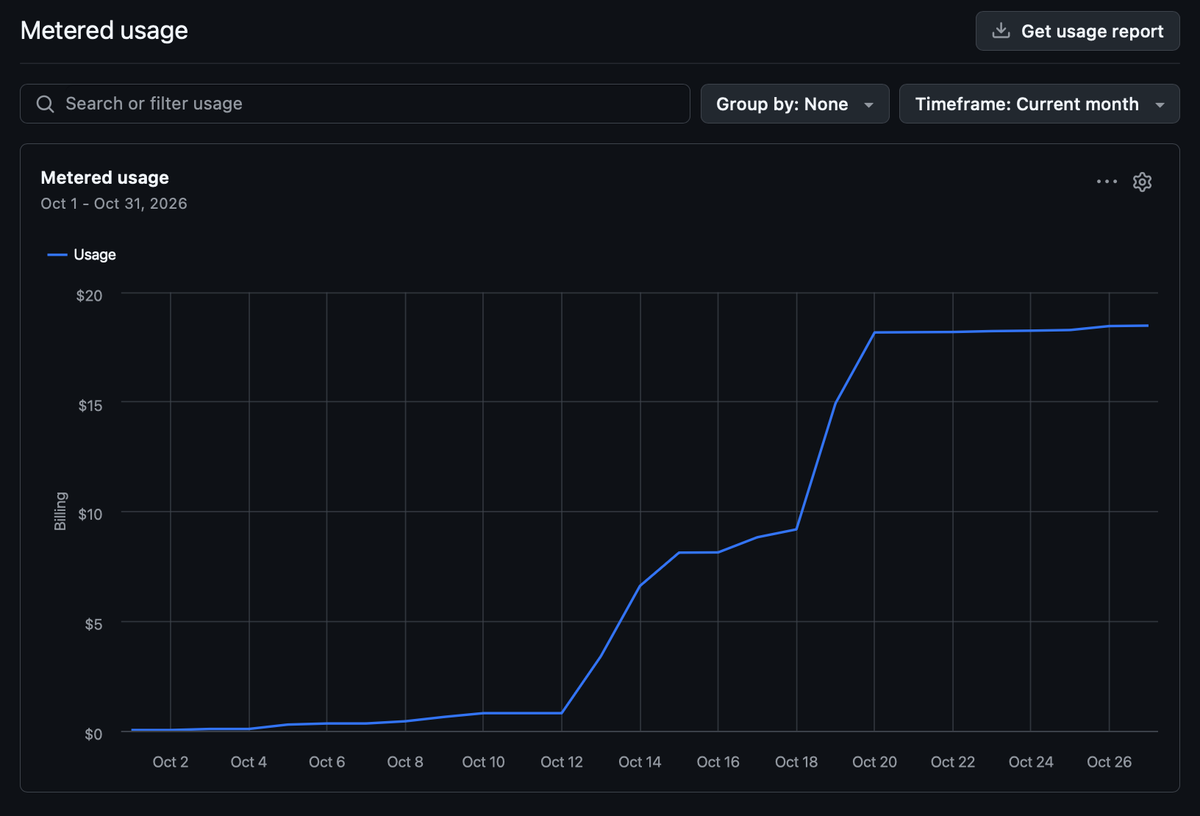
That chart is the whole story. Flat for two weeks, then a cliff once the small-issue workflow kicked in.
I build CI/CD services for a living, so the fix was obvious. I already had a Windows PC that runs 24/7 for my AI model experiments, and most of the time its compute was sitting there gathering dust. So I pointed the pipeline at it. Every build, link check, Lighthouse run and deploy for this site now happens on that machine.
Moving a pipeline from Linux runners to a Windows box is the fastest way to find every assumption your workflows made without telling you. Here’s what that looked like.
The setup
A self-hosted runner is a small agent you install on your own machine. It connects out to GitHub, waits for jobs, and runs them locally. Nothing has to be opened up on your router, because the runner calls GitHub, not the other way around.
The install is short:
- In the repo, go to Settings → Actions → Runners → New self-hosted runner and pick Windows.
- Download and unzip the runner into its own folder, then run
config.cmdwith the URL and the one-time token GitHub shows you. - Say yes to running it as a Windows service, so it starts with the PC and doesn’t need a terminal open.
- Add a custom label. Mine is
blog.
Then every workflow job asks for that machine by label:
runs-on: [self-hosted, Windows, blog]
Honestly, this part was easy. No snags at all.
The only thing to know: on a personal account, a runner belongs to one repository. Organizations can share a runner across repos, but personal accounts can’t. This PC now runs separate runners for three personal projects, this blog included. Each one is its own install, in its own folder, as its own service, and labels keep each repo’s jobs on the right runner.
What broke
1. Bash wasn’t there
My workflow steps use shell: bash. On GitHub’s hosted Windows runners that just works, because Git Bash is already on the PATH. My runner runs as a Windows service, and the service’s PATH only had Git’s cmd folder, not the folder where bash.exe lives. Every bash step failed.
Fix: a small composite action, setup-git-bash, that runs first in every job. It finds git.exe, looks for bash.exe next to it, and adds that folder to GITHUB_PATH for the rest of the job.
2. Then bash broke in a weirder way
That fix had a bug of its own (I’ve definitely never fixed a bug that introduced a new one… not me!). To log which version it found, the action ran bash --version | Select-Object -First 1. PowerShell’s Select-Object -First 1 stops reading after the first line, which closes the pipe while bash is still writing. Bash notices and exits with an error, and the step failed. Sometimes. It depended on timing.
An intermittent failure in a step whose only job was to print a version number. If you’ve read my post on what actually makes a test flaky, you know how I feel about calling that “flaky.” It wasn’t random. It was a real bug that only showed up some of the time.
Fix: capture all of bash’s output first, then print the first line.
3. An action that couldn’t even be downloaded
I’d been using the popular Lighthouse CI action to check accessibility and SEO scores. On Windows it fails before it starts: its bundled node_modules has file names that differ only by upper and lower case. Linux treats those as two files. Windows treats them as one, so the checkout breaks.
Fix: skip the action and call the Lighthouse CI command-line tool with npx @lhci/cli, pinned to a version. Fewer moving parts anyway.
4. A Linux-only link checker
The link checker’s GitHub Action only ships Linux binaries. Fix: another small composite action that downloads the Windows build of lychee once, caches it in the runner’s tool cache, and puts it on the PATH. Hugo gets the same treatment, so after the first run neither one is downloaded again.
5. Strangers’ code on my machine
This one made me stop and think. The repo is public. With a self-hosted runner, anyone who opens a pull request from a fork could, in principle, get their code run on my PC. GitHub’s own docs warn against self-hosted runners on public repositories for exactly this reason.
Fix: every CI job checks that the pull request comes from this repo, not a fork, and skips otherwise:
if: github.event.pull_request.head.repo.full_name == github.repository
For a one-person blog with that guard in place, I’m comfortable. For a project with outside contributors, I wouldn’t be. I also decided to make this repo private, as it was only needing to be public to use the GitHub Pages feature on a Free plan. That gets fixed if you bump up to the $4 pro plan.
What it looks like now
Every pull request runs markdown lint, a Hugo build, a check that every old get-testy URL still resolves, an internal link check, Lighthouse on three pages, and a check that no post goes live with an unfinished gap. Then it builds a preview with drafts that I can download and open. Merging to master builds again, deploys to GitHub Pages, and checks the old URLs one more time against the live site.
All of it runs on my own PC, as often as I want, without watching a usage meter.
Was it worth it?
For me, 100%. I get to run CI as much as I like, on compute I already own that was otherwise idle. The machine is on around the clock anyway, because I also run CLEF on it, Cloudflare’s open-weight decision models, to try out multimodal classification. A few CI runners on top cost me nothing extra.
But this is a personal-project answer. If I were working on something with other people, I wouldn’t put their CI on my PC. I’d go the other way: tune the pipeline to run on smaller hosted runners, and trim down what actually needs to run on every pull request. Not every typo fix needs three Lighthouse runs.
The bigger lesson is one I keep relearning in DevOps: a pipeline that works is not the same as a pipeline you understand. Moving where it runs is the fastest way to find out which one you have.